



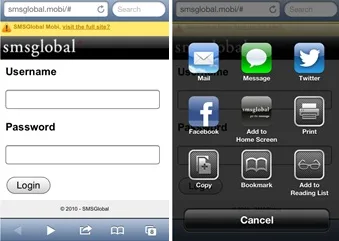
Accessing SMSGlobal from your mobile browser
Sometimes you just need to be able to access SMSGlobal while you’re away from your computer. Thankfully, you can access our messaging platform on your iPhone simply by going to smsglobal.mobi. Our mobi site allows you to send and receive SMS as well as access your contacts and check your messaging reports from any smartphone.
It’s also very simple to save the SMSGlobal mobi site directly to your iPhone Home Screen so you can access it quickly on-the-go.
To do so, open the mobi site and save a shortcut to your iPhone Home Screen. Do this by clicking the arrow icon at the bottom of the screen (see image one).
Now, select ‘Add to Home Screen’ – the middle option (see image two). The SMSGlobal icon should now be visible on your Home Screen so you can quickly access smsglobal.mobi at any time!


